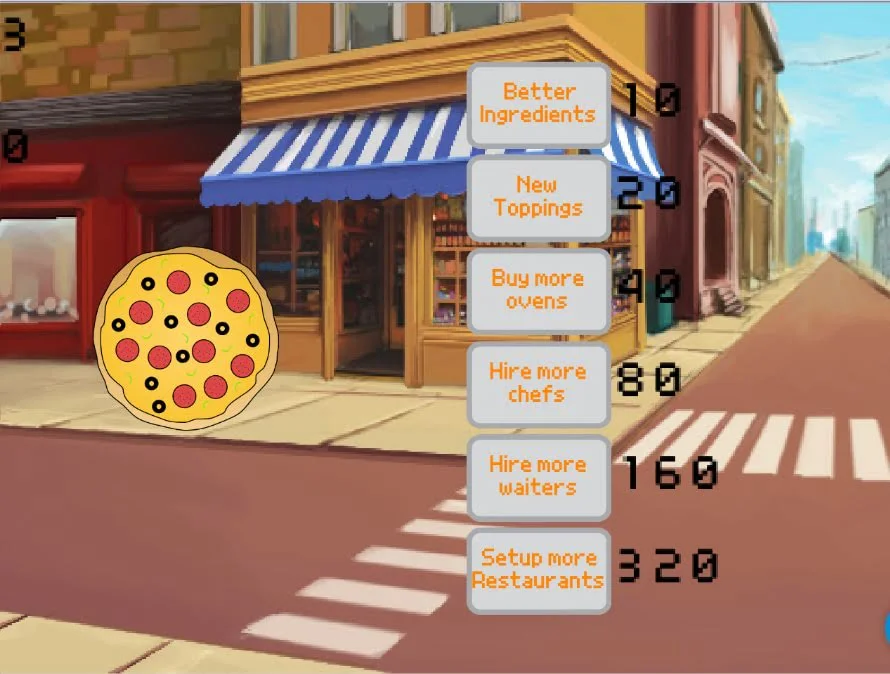
The Code Zone's latest idle game: 'Click For Pizza'
This week is The Code Zone's latest idle game: 'Click For Pizza'. In this fun simulator, you run a pizza shop where you aim to sell as many pizzas as possible in order to buy upgrades. The more upgrades you buy, the more pizzas you sell - and the cycle continues! Idle games are amongst some of our favourites here and all my Tuesday members were eager to get stuck in, cook pizzas and make some in-game money
For our Guided Hack, we focused on some animation where pizzas would start to fall in the background depending on how many pizzas the player was able to cook per second. Using a pizza variable to keep track of the 'Pizza Per Second' generation, we were able to create falling pizzas that would increase in quantity.
We also utilised special effects and layer management coding to keep all of the animation in the background so that our gamer's user interface stayed nice and tidy. Several of our coders love to use animation for their games so it was only natural that they duplicated and edited this animation code to add more effects such as floating fries, donuts and milkshakes.
On top of the Guided Hack, we also worked on several fun pieces of code such as adding new upgrades to purchase, creating bonus items which generated even more money and even implementing an auto-buy feature - very clever for those who want to leave the game running and rack up a huge high score! A few of my young coders flipped the idea of a pizza shop on its head and traded it in for some cool and unique themes such as running a doggy training centre and being a manager of a big bank.
I love it! Thanks for another great week Coders!
The Code Zone Team!
coding for kids, kids that code, coding club, coding
About The Code Zone Academy
Posts like this one are written by the mentors, about what members have been building. The Game Dev Academy has no fixed session time: a new build goes up every week and a child opens it whenever they are ready, with a STEM-certified mentor answering by text and video message when they get stuck.
Children build their own games rather than following a set course, starting in Scratch. Levels move down as readily as up, and staying where you are is a perfectly good outcome. Every mentor is background-checked and STEM-certified.
The blog is in two halves. Guides are the evergreen explainers written by the mentors who teach the clubs, covering the questions parents actually ask: what comes after Scratch, how to support a coding-mad child when you cannot code yourself, and what works for autistic and ADHD children.
Club news is the other half, and it is where posts like this one live: game jams, Minecraft builds and weekly roundups, written up by whoever ran the session. Neither is marketing. If you want to know what the work actually looks like before you sign up to anything, club news is the more honest read of the two.